


After running internal AI training at a Korean manufacturing company for over a year, I thought I knew what an HR chatbot needed. A good tool, some documents, done. I was wrong about the order.
I handle our in-house training credit system. The same questions come in again and again. Does a half-day outside seminar count? How do I count a training the company sent someone to? To answer, I had to open two documents side by side: a presentation from a few years ago, and this year's memo that my team had checked and cleaned up.
When I laid them on top of each other, several items had different deadlines and different criteria. Even a person got confused. So my first thought was simple: "I'll build a NotebookLM chatbot, and employees can just ask it." Then I stopped. If I feed it a document that confuses me, the bot will be confused in exactly the same way.
Two documents side by side with a laptop and a question mark in the margin
Why a chatbot repeats your policy's contradictions
NotebookLM is Google's AI notebook that answers only from the sources you upload. Every answer carries numbered citations that point back to those sources. That's why so many teams use it for internal policy bots.
But that strength is also the weak spot. If your sources mix an old rule and a new rule, the bot treats both as fact. One day it answers with the old rule, the next day with the new one. And it adds a citation number either way.
My documents were built exactly like that. Someone had copied the old original text, and then a note saying "this year's rule is different" sat on top of it. A person reads "the top part wins" and understands. An AI reads the whole file with equal weight.
The University of Chicago Academic Technology team (2026) makes a similar point in its NotebookLM guidance: the tool doesn't eliminate errors. Showing a source and giving a correct answer are two different things.
So I changed the order. Before building the chatbot, I fixed the documents it would read.
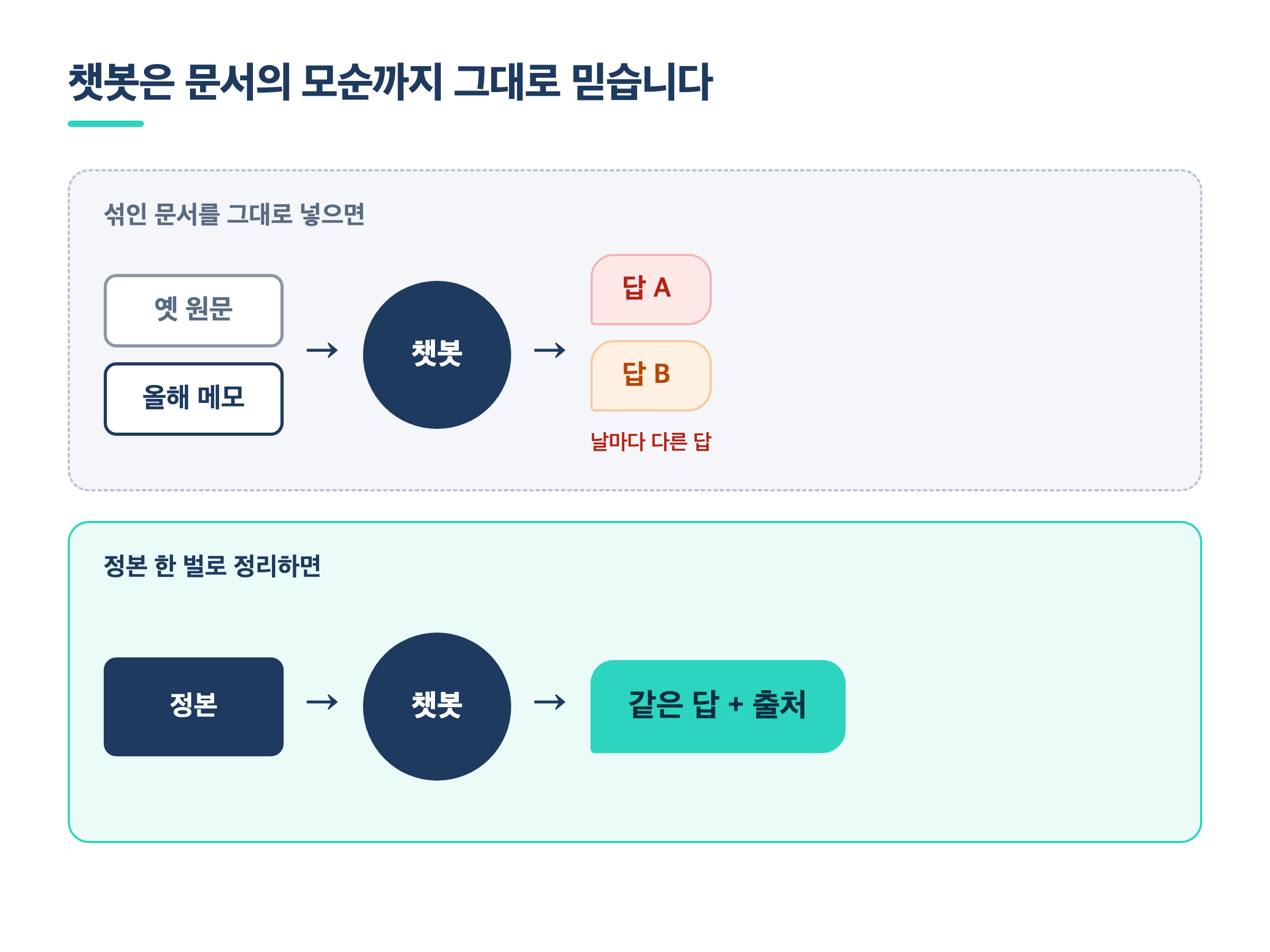
Chatbot answers split: mixed documents vs. one cleaned-up master document
Two AIs debated the policy for me
I can't see the holes in my own writing. So I split the job in two inside Claude Code. One model (Claude Fable 5) got a single task: review the policy critically. The other (Claude Opus, the one that helped write it) had to answer each point.
The reviewer came back with 22 issues. Some were rules that collided, some were cases that fell between two time ranges, and some were sentences where the old text and the new criteria didn't match. I had skimmed past many of those edges when I read alone.
What happened next was the interesting part. The writing AI didn't accept all 22. It pushed back on four, with reasons. One point claimed a paradox: people who attend less could end up better off. The writer answered that those people already had a confirmed penalty, so there was no paradox. In the second round, the reviewer withdrew all four.
Du et al. (MIT & Google DeepMind, 2023) reported that when several language models debate, trading answers and reasoning, factual accuracy goes up. That result comes from test-style questions, though. In my experience, the value of the debate wasn't producing the right answer. It was narrowing down which questions a human has to decide.
I've written before about a five-step method for catching errors an AI confidently invents, and my last post covered having one AI audit another's plan. Here I'll focus on how I carried those results into the policy chatbot.
I asked multiple-choice questions only a human can answer
After the debate, the 22 issues fell into two piles.
| Type | Count | What I did |
| Fixable by editing the document | 11 | Marked old text, unified table boundary notation, updated an appendix section |
| Only the policy owner can decide | 11 | Settled with multiple-choice questions plus a recommendation |
The second pile is not for AI to decide. Take "How do we count several short trainings?" or "Does a company-assigned training count as much as one you applied for yourself?" Answering those means writing a new rule.
What I changed was how the questions were asked. I didn't leave them open with "What should we do?" Each one had two or three options, plus a recommendation and the reason. The decision-maker only had to read and pick. All 11 questions were done in three conversations.
Of the 11, I took the recommended answer on eight. On the other three, I chose differently. Instead of changing the approval line, I picked "ask by email before applying." One item I left as "not decided yet." Those three places where I differed from the recommendation were the company-specific context no AI could know.
How I built the NotebookLM policy chatbot
Once the criteria were settled, I kept one master document (the single source of truth). The employee manual PDF, the mobile web page, and the bulletin board notice all come from that one master. The chatbot reads only that master too.
For the setup itself, I followed almost exactly the internal-policy-chatbot method from a YouTube lecture (a NotebookLM 2.0 live session by Oppadu Excel).
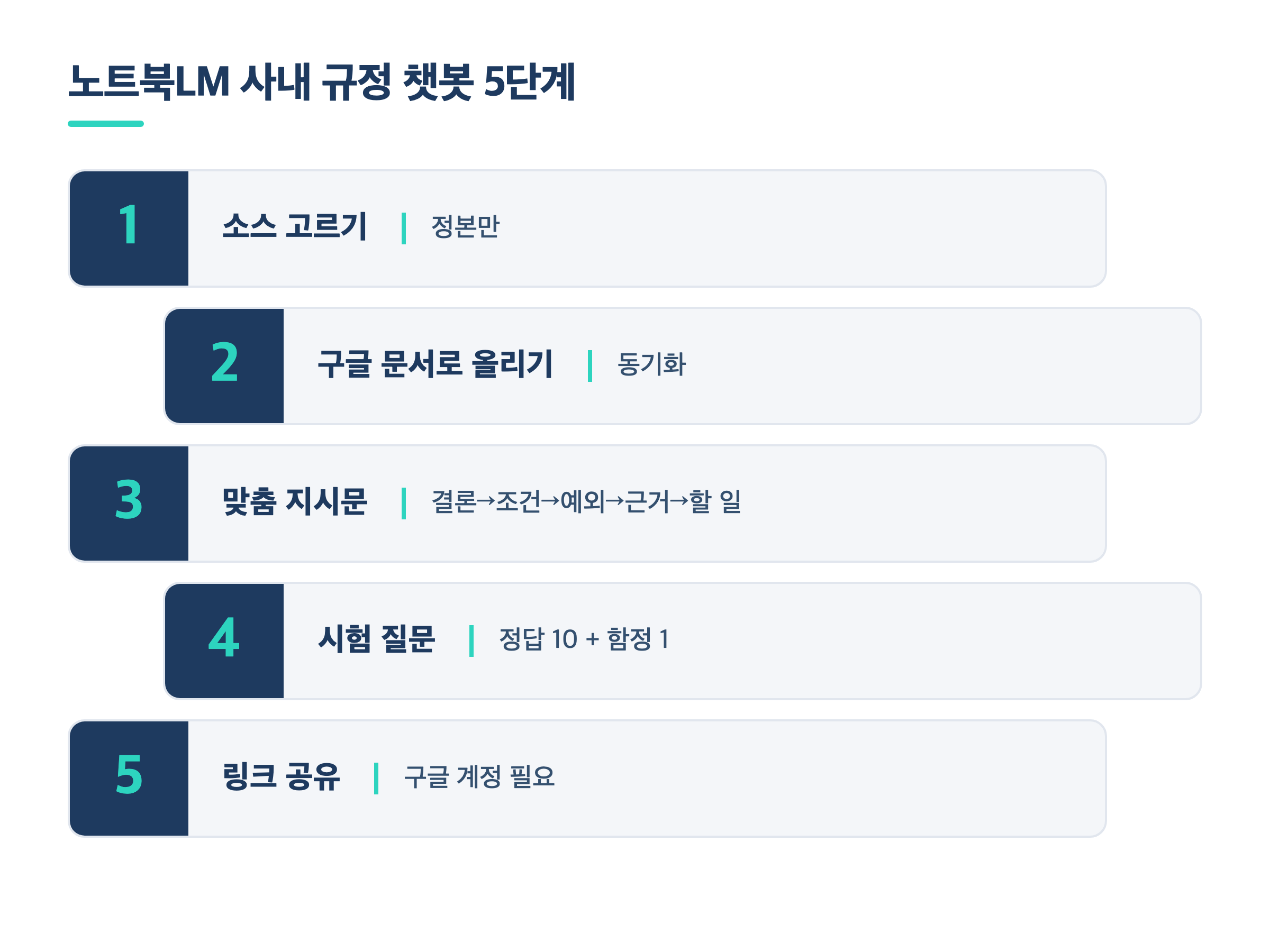
Five steps: master document, Google Doc, instructions, test questions, sharing
| Step | What I did | Why |
| 1. Pick sources | Added only the cleaned master and the FAQ | Old text mixed in means old-rule answers |
| 2. Upload as a Google Doc | Saved it as a Google Doc in Drive, then linked it as a source | When the policy changes, edit the doc and sync |
| 3. Custom instructions | Set the answer order and what to say when it doesn't know | Fixes the answer format and its limits |
| 4. Test questions | 10 questions with known answers + 1 trap | Find wrong answers before launch |
| 5. Share the link | Shared by link with view-only access | Viewers need to sign in to a Google account |
Step 2 mattered more than I expected. According to Google NotebookLM Help (2026), a source linked from Drive updates when the original changes, and you can also press "sync" by hand. Policies shift a little every year. A chatbot you have to delete and re-upload will end up abandoned.
Here are the custom instructions I used in step 3. Copy them and adapt them to your company.
You are the guide for our company's [XX] program.
Always answer in this order.
1. Conclusion: state the answer in one or two sentences first.
2. Conditions: explain who, how many hours, and which type applies.
3. Exceptions and cautions: list the caps and anything that needs prior consultation.
4. Basis: say which source and which part it comes from.
5. What to do now: give step-by-step actions, such as which form or report to file.
If the information is not in the sources, do not guess.
Answer: "This isn't confirmed in the provided materials. Please contact the responsible team."
The last two lines matter most. Getting a chatbot to say what it doesn't know is harder than getting it to say what it does.
The pre-launch test caught two errors
Before opening the link, I ran a test. It had 10 questions whose answers I already knew, and one trap question about something not in the documents at all. I opened a fresh conversation for every question so context from earlier ones couldn't leak in.
All 11 chatbot answers matched the master document. On the trap question, it said "This isn't confirmed," just as instructed. With results that good, I wanted to stop there.
The problem wasn't the chatbot. It was the extra materials NotebookLM generated for me. I had asked it for an employee FAQ table, and it merged the time ranges of two different trainings into one row and got one side's criteria wrong. The briefing slides filled three titles with meaningless English. I found both by checking them line by line against the master.
I also made a mistake myself. While telling it to fix a slide, I told it to add wording that wasn't in the master. I caught that on re-checking and reverted it. Verification was needed for my own instructions, not just the AI's output.
| Before: replying from open documents | After: master document + tested chatbot | |
| Basis | Compare the old text and this year's memo side by side | Answers only from one cleaned master |
| Consistency | Wording varies by person and by day | Fixed order: conclusion, conditions, exceptions, basis, action |
| Unknown questions | Easy to answer with a vaguely similar rule | "Not confirmed + contact the team" |
| When policy changes | Find and fix every file | Edit the Drive doc, sync once |
| Pre-launch check | None | 11 test questions + line-by-line check of extra materials |
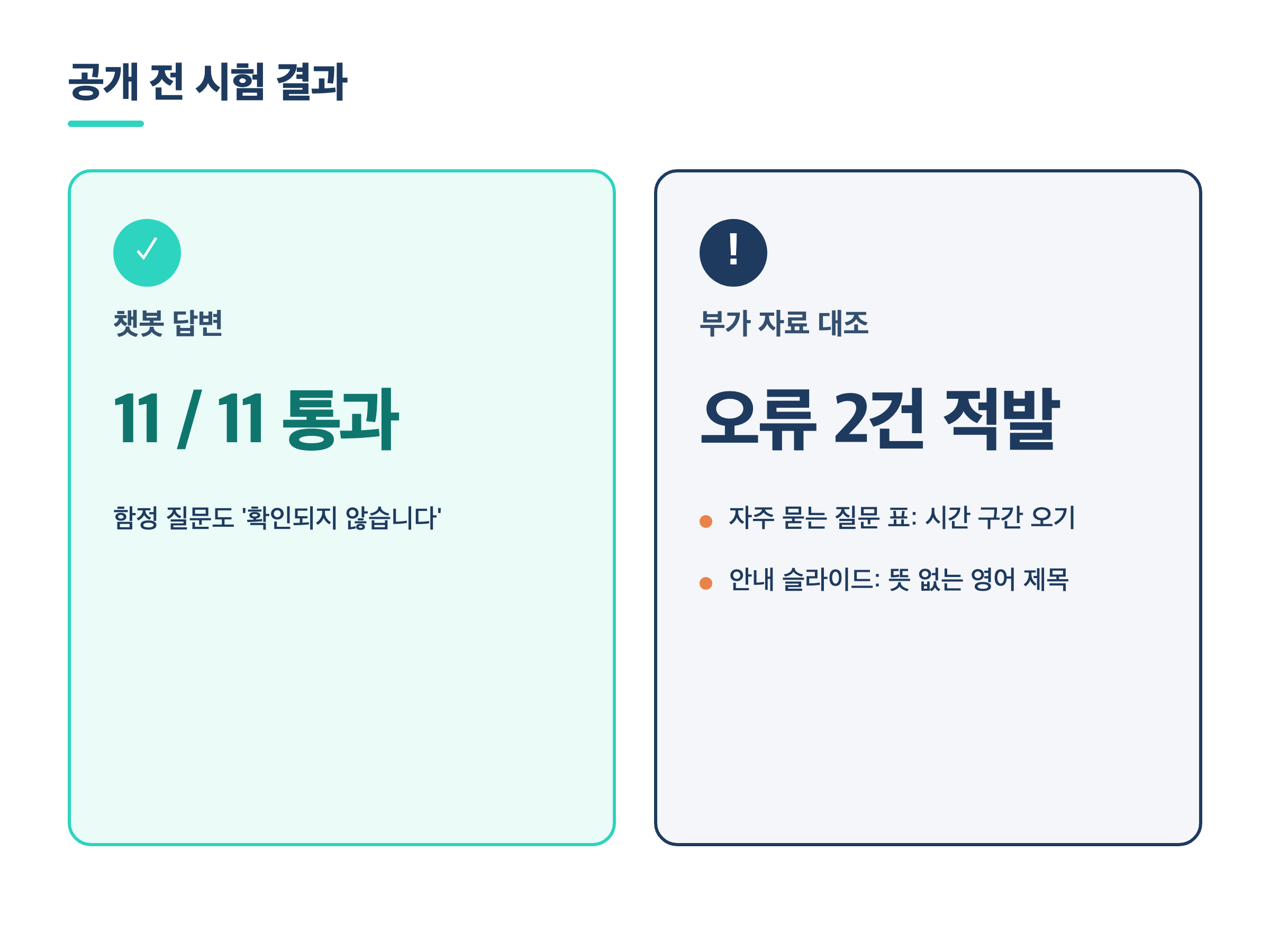
Pre-launch test: 11 answers passed, 2 errors caught in the extra materials
Conclusion: a chatbot that says "I don't know"
The whole run, from the first review to the public link, took about eight days at the end of September 2026. The order came down to three things. Fix the documents before the chatbot. Ask multiple-choice questions for what only a person can decide. Test with known answers before you go live.
If you're thinking about a company policy chatbot, read your uploaded documents out loud once. If two sentences say different things anywhere, the chatbot will wobble at that spot. If you're weighing where a tool like this fits in a wider rollout, my post on the five stages of company AI adoption may help.
The Analects has a line I keep coming back to: "To know what you know and to know what you don't know, that is real knowledge."
It takes people a long time to live by that. For the chatbot, two lines of instructions were enough. But those two lines only became trustworthy because I spent time fixing the documents first.
About the author: I've worked in Human Resource Development at a Korean manufacturing company for 18 years, and I use AI tools daily to automate training workflows and internal reporting. GoodTech AI is where I share what works, and what breaks, in real office jobs.


