
| 일 | 월 | 화 | 수 | 목 | 금 | 토 |
|---|---|---|---|---|---|---|
| 1 | 2 | 3 | ||||
| 4 | 5 | 6 | 7 | 8 | 9 | 10 |
| 11 | 12 | 13 | 14 | 15 | 16 | 17 |
| 18 | 19 | 20 | 21 | 22 | 23 | 24 |
| 25 | 26 | 27 | 28 | 29 | 30 | 31 |
- 엑셀VBA자동화
- CreativeThinking
- ChatGPT
- promptengineering
- 직장인ai활용
- Anthropic
- aiproductivity
- claudecode
- WorkplaceWellness
- claudeai
- 클로드코드
- productivity
- HRAutomation
- workplaceAI
- NonDeveloperCoding
- 직장인ai
- FutureofWork
- 업무자동화
- CitizenDeveloper
- GenerativeAI
- AIAdoption
- chatGPT활용법
- HRTECH
- AISkills
- notebooklm
- WorkplaceAutomation
- AICreativity
- ai에이전트
- AI workplace
- vibecoding
- Today
- Total
GoodTechAI
Our Training System Missed 14 Ghost Employees — AI Found Them in 30 Seconds 본문
Our Training System Missed 14 Ghost Employees — AI Found Them in 30 Seconds
GoodTechAdviser 2026. 3. 23. 13:34
Every year around this time, the same scene plays out.
As performance review season approaches at my company in Korea, the HR training manager's screen fills with Excel files. Who completed their required training this year? Who did not? Tab after tab, matching names, mapping job titles, sorting by department.
I have been doing this for 18 years. This year, I asked AI to "take a look," and it found 14 ghost employees that our training management system had never caught — in about 30 seconds.
Table of Contents
1. The Annual Training Compliance Ritual2. How AI Found 14 Ghost Employees in 30 Seconds
3. The Surprising Data: Team Leaders at 56.4%
4. The "Make It Sound Less Like AI" Email Episode
5. What AI Could Not Do — An Honest Limitation
6. FAQ
The Annual Training Compliance Ritual
At my company in Korea, we have a credit-based training system:
- Complete an 8-hour training course = 1 credit
- You need 4 credits per year
- Plus 2 community service activities
- Fall short, and it affects your performance review
Every year before performance reviews, the process goes:
Step 1. Extract completion data from the training management system
Step 2. Cross-reference with HR employee records
Step 3. Analyze by job title, department, and team
Step 4. Compile the non-compliant list
Step 5. Send individual notification emails to evaluators
Doing this manually takes a full day — 8 hours. Opening Excel files with corrupted filenames, distinguishing employees with identical names, toggling between tabs dozens of times. After 18 years, this kind of fatigue never gets easier.
[Image: section1_image.png]

How AI Found 14 Ghost Employees in 30 Seconds
This year, I decided to try a different approach. I handed the Excel file to AI (Claude) and said:
Time to results: about 30 seconds.
But the results were strange. Tab 1 had 173 people. Tab 2 had 217. The numbers did not match.
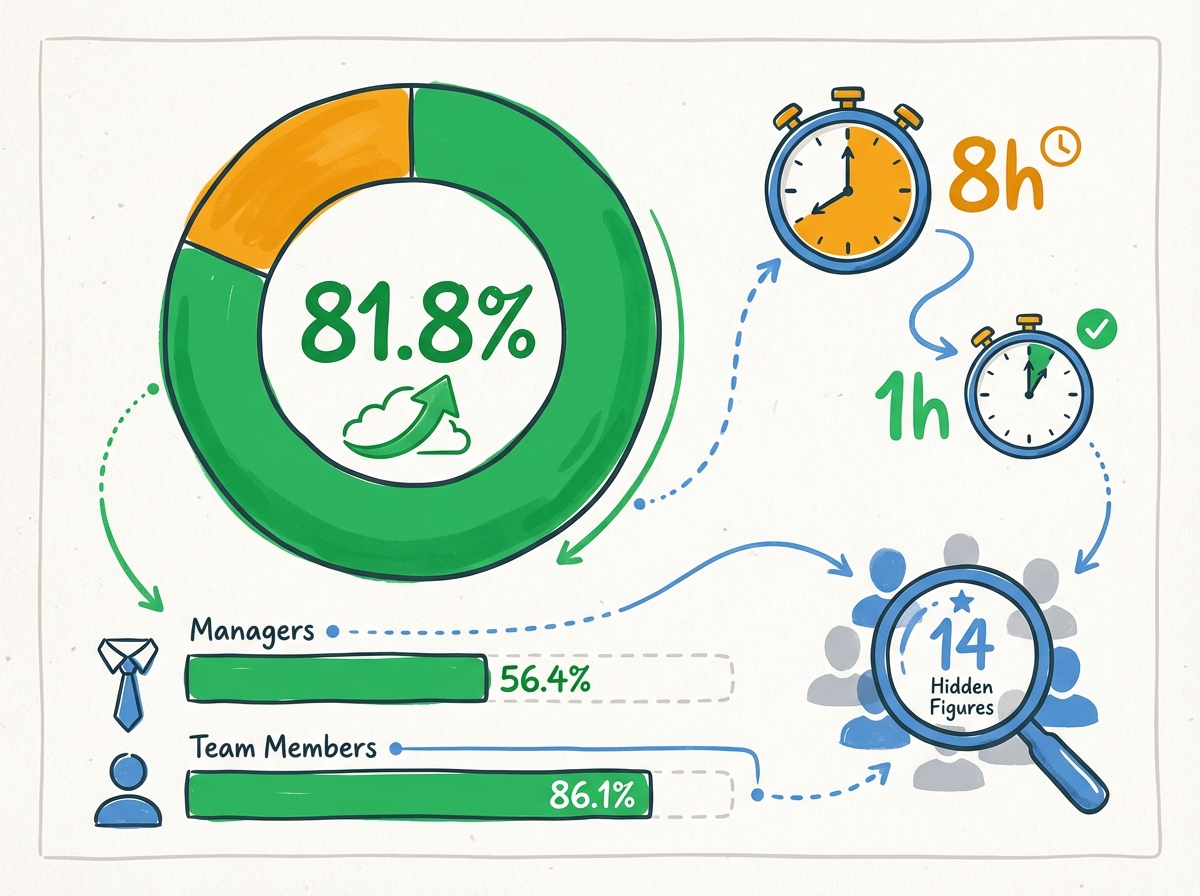
AI broke it down calmly. After excluding executives and special-status employees who are exempt from training, the actual target population was 181 people. Among those 181, 14 were completely absent from Tab 1.
These 14 employees had not taken a single training course in the entire year.
Here is the blind spot in training management systems: they only show people who have at least one completion record. Someone who completed zero courses simply does not appear. Zero-course employees vanish like ghosts.
In 18 years of using this system, I had never questioned this blind spot. One sentence to AI — "compare these two lists" — uncovered a gap that may have existed for years.

The Surprising Data: Team Leaders at 56.4% vs Staff at 86.1%
While I was at it, I asked AI to analyze the full completion picture. The results made me do a double-take.
| Group | Eligible | Completed | Not Completed | Rate |
| All Employees | 181 | 148 | 33 | 81.8% |
| CS(P)-4 Grade | 32 | 22 | 10 | 68.8% (lowest) |
| Team Leaders+ | 39 | 22 | 17 | 56.4% |
| Staff Level | 142 | 126 | 16 | 86.1% |
Team leader completion rate: 56.4%.
The people who are supposed to encourage their teams to complete training were themselves falling short — by nearly 30 percentage points compared to staff.
As an HR professional, I understood what this number really meant. It was not about laziness. Team leaders are buried in meetings, reports, and client management. Finding 8 hours for a training course is genuinely difficult at that level. I had always sensed this, but seeing it in hard numbers hit differently.
That single data point created the basis for a new initiative: "short-format intensive training programs specifically for team leaders." If I had done this analysis manually, I likely would not have reached that insight.
The "Make It Sound Less Like AI" Email Episode
With the analysis done, the next step was emailing each evaluator about their team's non-compliant members. I asked AI:
Within minutes, 8 neatly organized group lists appeared. I then asked AI to draft the email — and the first version made me smile.
It was too polished. Too perfectly structured. Anyone reading it would immediately think, "An AI wrote this."
So I added one more instruction:
The revised version was much better. Instead of a rigid official notice, it read like a colleague saying, "Hey, could you check on this?" That one small conversation completely changed the recipient experience.
Task-by-Task Time Comparison: Manual vs. AI
| Task | Manual | With AI | Reduction |
| Finding missing employees | 1.5 hours | 30 seconds | 99.4% |
| Completion report generation | 2 hours | 3 minutes | 97.5% |
| Job title mapping + duplicates | 1 hour | 2 minutes | 96.7% |
| Email distribution (8 groups) | 2 hours | 5 minutes | 95.8% |
| Email draft + tone adjustment | 1.5 hours | 10 minutes | 88.9% |
| Total | 8 hours | ~1 hour | 87.5% |

What AI Could Not Do — An Honest Limitation
Not everything was perfect. There was one gap.
I had to send the actual emails myself. Our company uses Outlook, and IT security policy does not yet allow AI tools to connect to our email system. So I took the AI-generated drafts and distribution lists and sent each email manually through Outlook.
Honestly, that was the most time-consuming part. The analysis and preparation took about an hour, but email sending required additional time on top.
But this is not a limitation of AI — it is an organizational readiness issue. Once IT security policies evolve, this last step can be automated too. When that happens, the entire workflow from analysis to delivery will truly fit within a single hour.
Getting Started: It Begins With One Sentence
The only AI tool I used was Claude. No special programming knowledge required.
Step 1. Hand the Excel file to AI
Step 2. Say, "Compare these two tabs"
Step 3. Review the results and ask follow-up questions
According to Hunet's survey, the top corporate training investment priority for 2026 is "AI education" at 50.9% (Hunet, 2025). Companies are investing more in AI training, but on the ground, people still say "I'm too busy to learn."
From my experience, using AI starts not with "learning" but with "delegating." Pick your most tedious task and say, "Can you do this for me?" That is the starting point.
A Seoul Shinmun (2025) report found that workers in their 50s have the highest rate of viewing AI as a "work partner" among all age groups. Experienced professionals with clear objectives tend to use AI most effectively.
Closing — AI Is the Tool, Judgment Is the Human's Job
What AI did in this project was compare data, organize it, and draft emails.
But the interpretation — "Team leaders' low completion rate is not about laziness but about structural time constraints" — was a judgment only an HR professional with 18 years of organizational observation could make. The instinct that "an AI-sounding email should not be sent" came from years of working with real people.
As AI takes over data analysis and process automation, the HR role of reading human motivation and driving change becomes more important, not less (H.Place, 2025).
One step at a time. Start today by handing your most tedious Excel file to AI. "Can you clean this up for me?" — that single sentence is enough.
FAQ
Q. Can AI really analyze Excel files directly?
A. Yes. Tools like Claude can read uploaded Excel files, analyze data across multiple tabs, cross-reference records, and produce structured summaries. No formulas or pivot table knowledge required.
Q. Is it safe to upload employee data to AI tools?
A. This depends on your organization's data policies. Many AI tools offer enterprise plans with data privacy guarantees. Always check with your IT/security team first. You can also anonymize sensitive fields before uploading.
Q. What other HR tasks can benefit from this approach?
A. Any task involving data comparison, compliance checking, or report generation. Examples: headcount reconciliation, benefits enrollment audits, performance review aggregation, and turnover analysis. If it involves cross-referencing spreadsheets, AI can likely do it faster.


